The difference between a forgettable AI shirt and one people actually buy is rarely the tool — it's the prompt. Two sellers can use the same generator; the one who writes precise, print-aware prompts gets wearable art, and the other gets clip art. This guide teaches the prompt engineering system behind unique t-shirt illustrations: the anatomy of a strong prompt, a copy-paste template library, negative prompts, and the iteration workflow professionals use.
Table of Contents
- Why Prompts Matter More Than Tools
- The Anatomy of a Print-Ready Prompt
- Copy-Paste Prompt Template Library
- Negative Prompts: Telling the AI What to Avoid
- Typography Prompts and Text Handling
- The Iteration Workflow: From Draft to Final
- Print Prep: Resolution, Backgrounds, and Vectors
- Frequently Asked Questions
Key Takeaways
- A strong t-shirt prompt has five parts: subject, style, print constraints, background, and composition.
- Negative prompts prevent the gradients, shadows, and clutter that ruin print quality.
- Generate text-heavy designs in two passes: artwork first, typography second.
- Always finish with upscaling, transparent background export, and a mockup check.
Why Prompts Matter More Than Tools
AI image generators are generalists. Left to their own devices, they produce pretty pictures optimized for screens — soft lighting, busy detail, photographic backgrounds. T-shirt printing needs the opposite: bold, flat, high-contrast graphics with clean edges and controlled backgrounds. The prompt is where you translate "pretty picture" into "printable graphic."
Think of yourself as an art director briefing an illustrator. A vague brief ("draw a cool wolf") gets generic output. A precise brief ("flat vector wolf head, bold outlines, two-color palette, badge composition, isolated on white") gets something you can actually sell. For the broader business context, see our complete guide to AI-generated t-shirt designs for print-on-demand.
The Anatomy of a Print-Ready Prompt
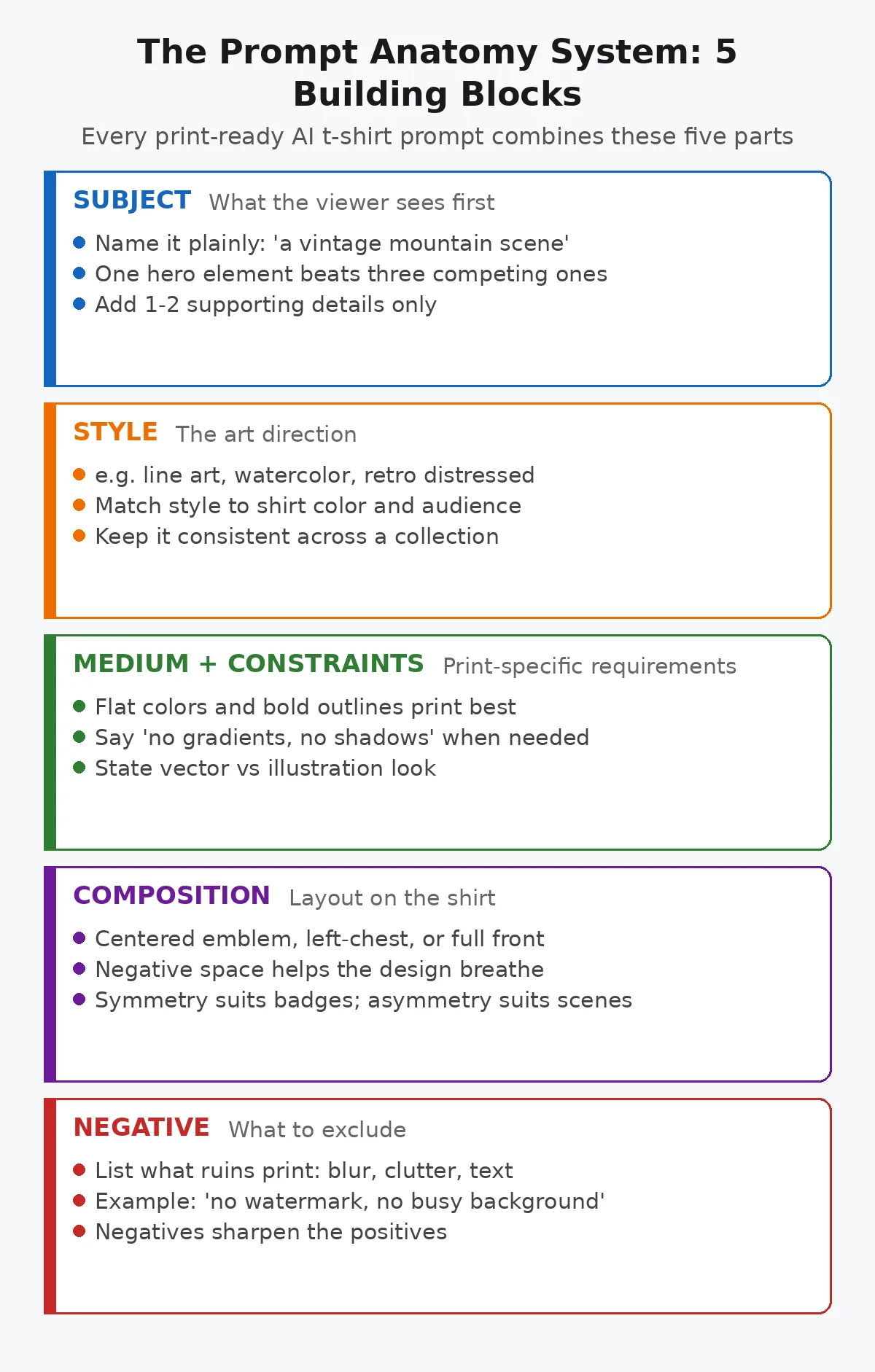
Every strong t-shirt prompt contains these five elements, in roughly this order:
- Subject + action: the concrete thing depicted. "A lighthouse keeper rowing a small boat through fog" beats "lighthouse."
- Style anchor: a named aesthetic the model recognizes. "Flat vector," "vintage woodcut," "risograph print," "1930s rubber-hose cartoon," "ukiyo-e," "90s streetwear."
- Print constraints: the technical vocabulary of apparel. "Bold outlines," "limited color palette," "flat colors," "clean edges," "high contrast," "no gradients."
- Background instruction: the most-skipped, most-important element. "Isolated on a solid white background" or "transparent background, no backdrop, no scenery."
- Composition: "centered composition," "symmetrical badge layout," "circular emblem," "chest-print placement."
Full example: "Flat vector illustration of a lighthouse keeper rowing a small boat through fog, bold outlines, limited palette of navy, cream, and burnt orange, flat colors, no gradients, isolated on a solid white background, centered badge composition, t-shirt graphic."
Notice how little of the prompt is about the subject and how much is about the form. That ratio is the whole secret.
Copy-Paste Prompt Template Library
Adapt these templates by swapping the bracketed subject. Each is written for printability first.
Minimalist Vector
"Minimalist [mountain goat on a cliff edge], single-weight line work, flat vector, black ink on white, high contrast, isolated on a solid white background, centered composition, t-shirt graphic."
Vintage Distressed
"Vintage [national park] travel badge, distressed screen-print texture, washed-out colors, halftone shading, retro typography-free emblem, circular composition, isolated on white, t-shirt graphic."
Retro Cartoon
"1930s rubber-hose cartoon style [cheerful barista holding a giant coffee cup], thick bold outlines, limited palette of red, cream, and brown, flat colors, no gradients, isolated on white background, t-shirt graphic."
Japanese Woodblock Fusion
"Ukiyo-e inspired illustration of [a koi fish circling a lantern], bold contour lines, flat color blocks in indigo and vermilion, no gradients, isolated on a solid white background, vertical composition, t-shirt graphic."
Bold Line Art
"Continuous line art drawing of [a woman's profile with wildflowers], single unbroken stroke, elegant minimal contour, black on white, generous negative space, centered, t-shirt graphic." — For more on this aesthetic, see our guide to AI minimalist line-art shirts.
Streetwear Graphic
"90s streetwear graphic of [a roaring bear], heavy grain texture, saturated colors, collage aesthetic, bold display composition, high contrast, isolated on white background, t-shirt graphic."
Model parameters (Midjourney)
Append --ar 1:1 for standard chest prints or --ar 2:3 for taller front prints. Use --style raw when you want the model to follow your print constraints literally rather than beautifying them. Keep --stylize low (under 200) for predictable, printable output.
Negative Prompts: Telling the AI What to Avoid
On tools that support negative prompts (Leonardo, Stable Diffusion, and others), explicitly excluding print-hostile traits dramatically improves results:
"photorealistic, 3d render, soft shadows, gradients, lens flare, blurry, distorted anatomy, extra limbs, watermark, text, busy background, low contrast"
Three exclusions deserve special attention for apparel:
- Gradients and soft shadows: beautiful on screen, muddy on fabric — especially in screen printing.
- Text: AI models still garble lettering unpredictably. Exclude text from the artwork pass and add it later (see below).
- Busy backgrounds: scenery behind your subject becomes an unprintable box. Force isolation.
Typography Prompts and Text Handling
Text on shirts is where AI most visibly fails — misspellings, warped letters, phantom words. The professional workflow separates the two jobs:
- Generate the artwork without text. Use a negative prompt to exclude lettering, or simply don't mention text.
- Add typography in a design tool. Place the art in Canva, Kittl, Photoshop, or Illustrator and set the type yourself with full control over font, kerning, and spelling.
If you must generate text inside the AI image, use models known for text rendering (Ideogram or DALL-E class models), keep the wording short — one to three words — and specify the exact phrase in quotes plus "clean legible lettering." Then zoom to 100% and check every letter before printing. A shirt that says "MOUNTAINS ARE CALLNG" is unsellable.
The Iteration Workflow: From Draft to Final
Professionals don't prompt once; they prompt in rounds:
- Round 1 — Exploration: run the template with 4–8 variations. Judge composition and concept only.
- Round 2 — Refinement: take the strongest variation and tighten the prompt — adjust the style anchor, palette, or composition terms.
- Round 3 — Print constraints: verify bold outlines, limited colors, and clean background at full zoom.
- Round 4 — Mockup test: place the art on a shirt mockup in the actual garment color. Designs that look great on white artboards can vanish on black fabric and vice versa.
Save every prompt that produces a winner in a prompt library — a simple document with the prompt, the niche, and the result. Over months, this becomes your most valuable asset: a private playbook of proven formulas.
Adapting Prompts Across Tools
The anatomy above is tool-agnostic, but each platform has quirks worth knowing. Midjourney responds strongly to style anchors and rewards shorter, punchier prompts — long sentences dilute its attention. DALL-E class models handle longer natural-language descriptions and quoted text better, so you can write the prompt almost conversationally. Recraft and similar vector-first tools prefer explicit "vector logo" framing and produce cleaner results when you name the exact output type ("t-shirt vector graphic, flat, two colors"). Leonardo's prompt-enhancement feature can help beginners, but review what it adds — it sometimes reintroduces the gradients you worked to exclude.
Print Prep: Resolution, Backgrounds, and Vectors
A great prompt still needs technical finishing before it becomes a product:
- Upscale to 300 DPI at print size (about 4500 × 5400 px for a full-front print).
- Export a transparent PNG. Remove the background cleanly — halos and off-white boxes scream amateur.
- Vectorize flat styles. Vector Magic or Illustrator's Image Trace turns bold, flat art into infinitely scalable paths.
- Check garment contrast. At least strong tonal separation between the art and the shirt color, or the design disappears on the body.
Looking for design inspiration across styles? Browse our designs collection to see how different aesthetics read on real garments.
Frequently Asked Questions
What are the best keywords for AI t-shirt prompts?
The highest-impact keywords are print constraints: "flat vector," "bold outlines," "limited color palette," "clean edges," "no gradients," and "isolated on a solid white background." Style anchors like "vintage woodcut," "risograph," or "rubber-hose cartoon" define the aesthetic.
Which AI model is best for t-shirt design prompts?
Midjourney excels at artistic illustration styles, DALL-E class models follow complex instructions and render text best, Recraft is strongest for vector-style logos, and Leonardo.ai offers a convenient all-in-one workflow with upscaling built in.
Why does my AI t-shirt design look bad when printed?
The usual culprits are low resolution (AI outputs are far below 300 DPI at print size), unremoved backgrounds printing as visible boxes, and gradients or fine detail that turn muddy on fabric. Upscale, isolate on transparency, and favor bold flat styles.
How do I get AI to spell text correctly on a shirt design?
The reliable method is two passes: generate the artwork with text excluded, then add typography yourself in a design tool. If you generate text in-image, use a text-capable model, keep it to a few words in quotes, and inspect every letter at full zoom.
Can I use the prompts in this guide commercially?
Yes — prompts themselves aren't copyrightable artwork, and these templates are free to adapt. What matters for commercial use is the license terms of the AI tool you generate with: check your plan's commercial rights before selling, and avoid trademarked subjects.