There was a time when launching a t-shirt brand meant one of two things: you could draw, or you could pay someone who could. AI image generators have removed that gate. Today, anyone with a clear concept can generate professional-looking t-shirt artwork in minutes — and print-on-demand (POD) platforms will print and ship it with zero inventory.
Table of Contents
- Why AI Design Changed the T-Shirt Game
- How AI Image Generation Works for Apparel
- The Best AI Tools for T-Shirt Design in 2026
- Prompt Patterns That Produce Print-Ready Art
- Style Library: What Sells on Shirts
- From Prompt to Print-Ready File
- Copyright and Commercial Rights Basics
- Frequently Asked Questions
Key Takeaways
- Vector-first tools suit logos and typography; illustration-focused models suit detailed graphics.
- Print-ready prompts need flat colors, bold outlines, and explicit background control.
- Upscaling to 300 DPI and transparent-background export are non-negotiable steps before upload.
- Commercial rights come from the AI tool's paid plan terms — check them before selling.
Why AI Design Changed the T-Shirt Game
For decades, the bottleneck in apparel was the artwork. Commissioning an illustrator took days and real budget; stock graphics looked like everyone else's. Generative AI broke that bottleneck in two ways: speed and iteration. You can now test ten visual directions for a niche — say, vintage-style designs for kayak anglers — in an afternoon, then keep only the ones with real character.
That speed changes strategy, not just output. Instead of betting a whole collection on one expensive illustration, sellers can validate concepts fast: generate, mock up, check search interest, and only scale what resonates. The competitive edge has moved from drawing skill to concept, curation, and prompt craft — which is exactly what our AI t-shirt prompt engineering guide covers in depth.
One caveat worth internalizing early: AI is a production partner, not a replacement for taste. The sellers who stand out combine AI output with human judgment — picking the right style for the niche, fixing composition, and adding typography with intention.
How AI Image Generation Works for Apparel
Most modern AI image tools use diffusion models: they start from visual noise and progressively refine it into an image guided by your text prompt. For t-shirt design, the important implication is that the AI thinks in pictures, not in print files. It will happily generate gorgeous gradients, soft shadows, and busy backgrounds — all of which can look muddy when printed on fabric.
That is why apparel prompting is its own discipline. A good t-shirt prompt constrains the AI the way a screen printer would: limited colors, bold shapes, clean edges, and a defined background. You are not just describing a subject; you are describing a printable graphic.
The second apparel-specific constraint is resolution. AI generators typically output images around 1024–2048 pixels wide. A full-front chest print needs roughly 4500 × 5400 pixels at 300 DPI. Bridging that gap — upscaling and often vectorizing — is the core technical workflow covered in the print-ready workflow below.
The Best AI Tools for T-Shirt Design in 2026
Different tools have different strengths. Match the tool to the job rather than forcing one generator to do everything:
| Tool | Strengths | Limitations | Best For |
|---|---|---|---|
| Midjourney | Exceptional artistic quality, texture, and lighting. | Discord-based workflow; text rendering can be unreliable. | Artistic and illustrative graphics |
| DALL-E / GPT image models | Strong instruction-following; handles text in images well. | Can look overly smooth or "digital." | Slogan tees and text-heavy layouts |
| Recraft | Generates vector-style output; strong with typography and logos. | Less painterly than illustration-first models. | Logos, badges, and clean vector graphics |
| Leonardo.ai | Polished web UI; built-in upscaling and background removal. | Free tier is limited; style consistency varies. | All-in-one browser workflow |
| Ideogram | Reliable text rendering inside designs. | Narrower style range than Midjourney. | Designs where the wording must be exact |
| Adobe Firefly | Trained on licensed content; integrates with Illustrator and Photoshop. | Stricter content filters; less stylistic range. | Commercially cautious brand work |
For a deeper breakdown of prompt craft across these tools, see Mastering the Canvas: AI Prompts for T-Shirt Illustrations.
Prompt Patterns That Produce Print-Ready Art
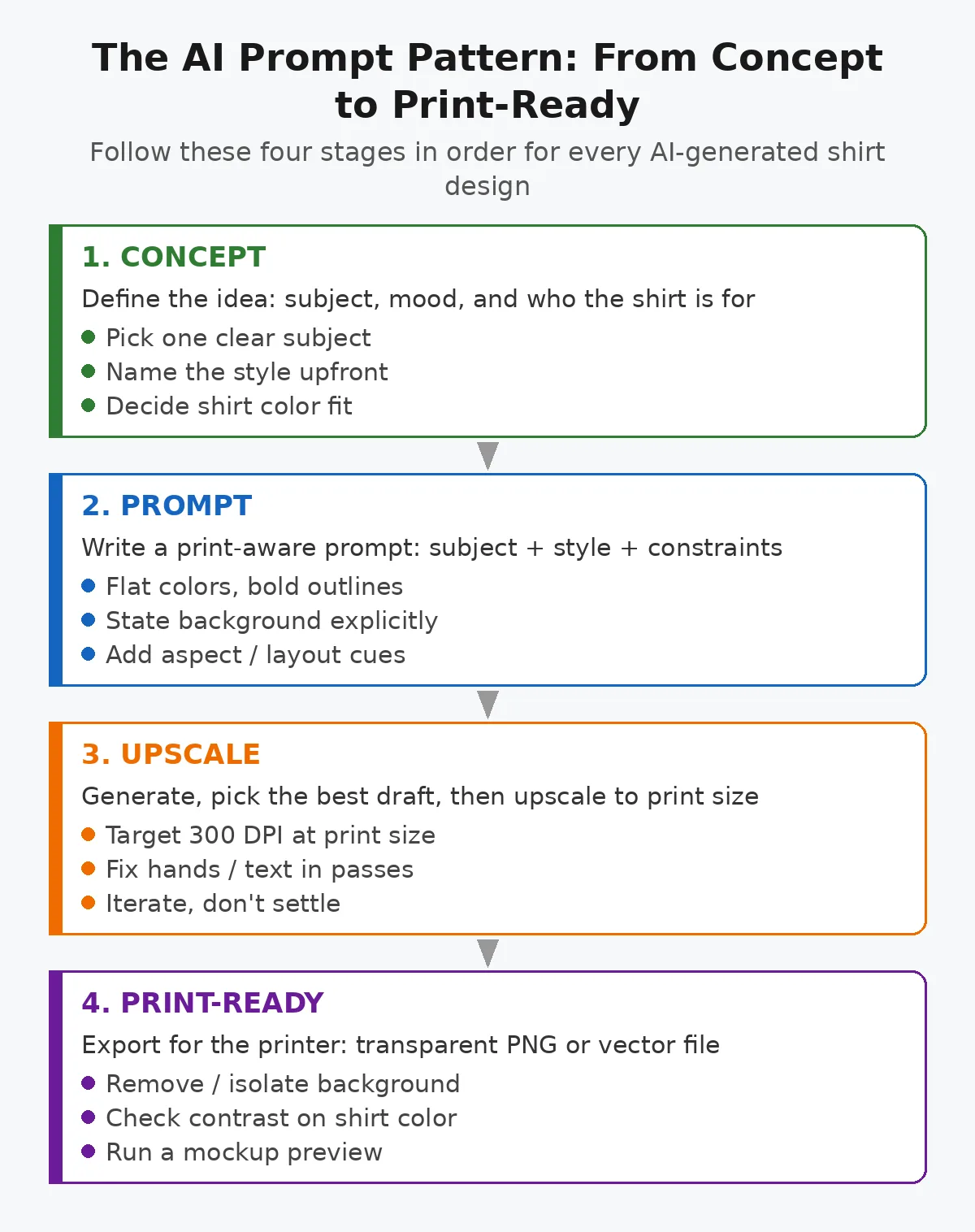
The prompts that work for social media rarely work for apparel. Print-ready prompts share a common anatomy:
- Subject + action: what is depicted, doing what ("a lighthouse keeper rowing through fog").
- Style anchor: a named aesthetic ("flat vector," "vintage woodcut," "risograph print," "90s streetwear").
- Print constraints: "bold outlines," "limited color palette," "clean edges," "no gradients."
- Background instruction: "isolated on a solid white background" or "transparent background, no backdrop."
- Composition: "centered composition," "symmetrical," "badge layout."
Example: "Flat vector illustration of a lighthouse keeper rowing a small boat through fog, bold outlines, limited palette of navy, cream, and burnt orange, clean edges, no gradients, isolated on a solid white background, centered badge composition, t-shirt graphic."
Two mistakes dominate beginner output: too much detail (fine textures turn to mud at print size) and ignored backgrounds (a square photo-like backdrop printed on a shirt looks like an iron-on from the 90s). Constrain both explicitly.
Style Library: What Sells on Shirts
AI can render almost any aesthetic, but a handful of styles consistently perform on apparel because they survive the journey from screen to fabric:
- Vintage distressed: "distressed texture, washed-out colors, halftone pattern, 1970s screen print effect." Forgiving of imperfections; hides print quirks beautifully.
- Minimalist vector: "flat vector, bold outlines, limited color palette, high contrast." Cheap to print, easy to wear — see our guide to AI minimalist line-art shirts.
- Badge and emblem: "circular badge layout, vintage outdoor emblem, symmetrical composition." A natural fit for hobbies, professions, and local pride niches.
- Retro cartoon / rubber-hose: "1930s rubber-hose cartoon style, thick outlines, limited colors." Playful and highly giftable.
- Japanese woodblock fusion: "ukiyo-e inspired, bold contour lines, flat color blocks." Distinctive and premium-feeling.
Style consistency across a collection matters more than any single design. Pick two or three aesthetics per niche and become recognizable.
From Prompt to Print-Ready File
Generation is step one of five. The full pipeline:
- Generate variants: produce 4–8 variations of each concept; keep the strongest one or two.
- Upscale: bring the file to at least 300 DPI at print size (roughly 4500 × 5400 px for a full-front print). AI upscalers like Topaz Gigapixel or built-in tool upscalers work well.
- Remove the background: export a transparent PNG. Built-in removers, remove.bg, or Photoshop's Select Subject all do the job.
- Vectorize (optional but recommended): tools like Vector Magic or Illustrator's Image Trace convert the art to scalable paths — ideal for bold, flat styles.
- Mock up: place the art on a realistic shirt mockup before uploading. Mockups sell the feeling; flat files don't. Then upload to your POD platform of choice (Printful, Printify, Redbubble, Merch by Amazon).
Want more design ideas to feed this pipeline? Browse our designs collection for style inspiration across niches.
Copyright and Commercial Rights Basics
Two separate questions matter here: can you sell AI-generated art, and can you stop others from copying it?
On selling: most paid AI plans grant commercial usage rights to images you generate — but terms differ by tool and tier, so read the actual license of the service you use before listing anything. Free tiers sometimes restrict commercial use.
On protection: under current US Copyright Office guidance, purely AI-generated imagery without meaningful human authorship is difficult to copyright. Adding substantial human creative input — custom typography, composition changes, hand-drawn elements — strengthens your position.
The bigger practical risk is trademarks, not copyright. Never prompt the AI for recognizable characters, logos, or brand marks. The AI will happily draw them; the legal exposure lands on you.
Frequently Asked Questions
Can I sell AI-generated t-shirt designs on Etsy and Redbubble?
Generally yes. Both platforms allow AI-assisted designs, provided you hold the commercial rights from your AI tool's plan and avoid trademarked or copyrighted subject matter. Etsy asks sellers to disclose AI involvement in the production process.
What resolution does an AI design need for t-shirt printing?
Aim for 300 DPI at the final print size — roughly 4500 × 5400 pixels for a standard full-front print. AI generators output much smaller files, so upscaling is a mandatory step, and vectorizing flat-style art gives the cleanest result.
Which AI tool is best for t-shirt design?
It depends on the style. Midjourney leads for artistic illustration, Recraft excels at vector-style logos and typography, and Ideogram or DALL-E class models handle text inside designs most reliably. Many sellers use two or three tools for different jobs.
Do I need design skills to use AI for t-shirts?
You don't need to draw, but you do need taste: composition, color sense, niche understanding, and prompt craft. The AI executes; you art-direct. Learning prompt patterns for print — flat colors, bold outlines, background control — is the highest-leverage skill.
Can AI-generated t-shirt designs be copyrighted?
Purely AI-generated images with no meaningful human authorship are difficult to copyright under current US guidance. Adding substantial human creative input — original typography, layout, or hand-drawn elements — strengthens your claim. This is general information, not legal advice.